Bevy's Sixth Birthday - Lighting and Libraries
Written in response to Bevy's Sixth Birthday.
Introduction
It's the sixth birthday of Bevy, which now makes it 4 years in total that I've been contributing!
It's been a pretty packed year, so unlike past years, for this blog post I'm only going to cover what I've personally been working on this year.
A Year in Review
Solari - Success!
4 years into Bevy, and I'm still heavily focused on 3D rendering.
If you've been following my work, it shouldn't come as a surprise that 90% of what I've done this year has been working on Solari.
For those of you who haven't been following, Bevy Solari is a realtime pathtracer aiming to be a high-end, forward-looking alternative to Bevy's main renderer.
I've written plenty of articles on Solari before, but the TLDR is that I want to make lighting more accessible to beginners, and push the boundaries of what Bevy is capable of. Rather than having to learn a mix of shadow maps, lightmap baking, light probe baking, environment maps, screen space methods, what their pitfalls and limitations are, and spending hours tweaking things, pathtracing replaces all that complexity with a single, much easier to reason about lighting algorithm.
NVIDIA Zorah Scene, albedo rendering (no lighting)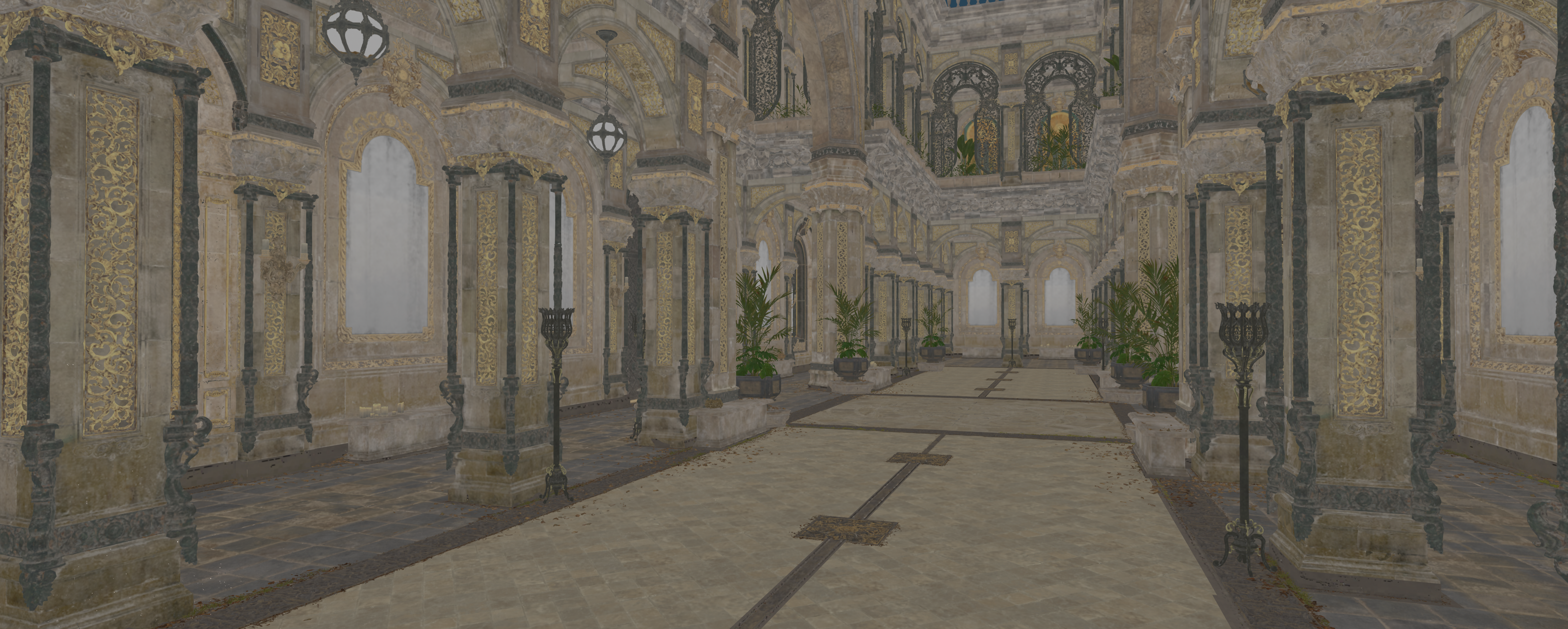
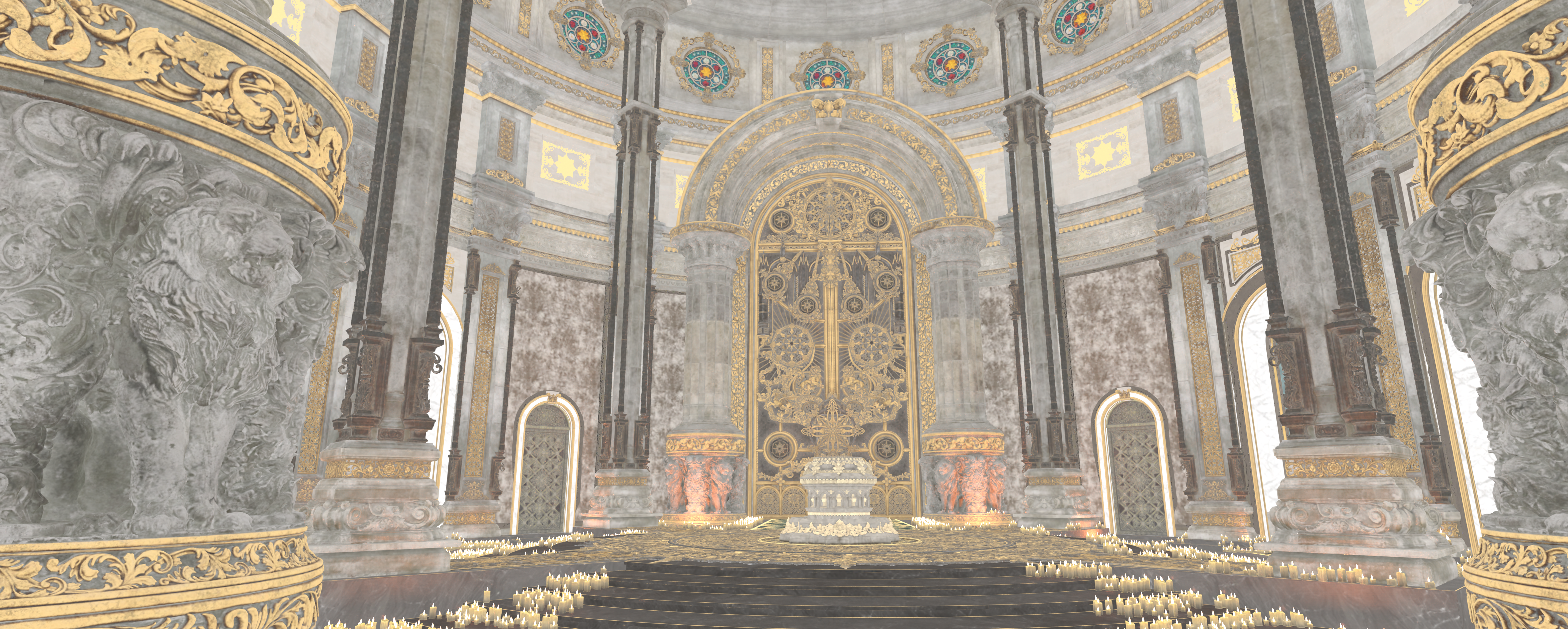
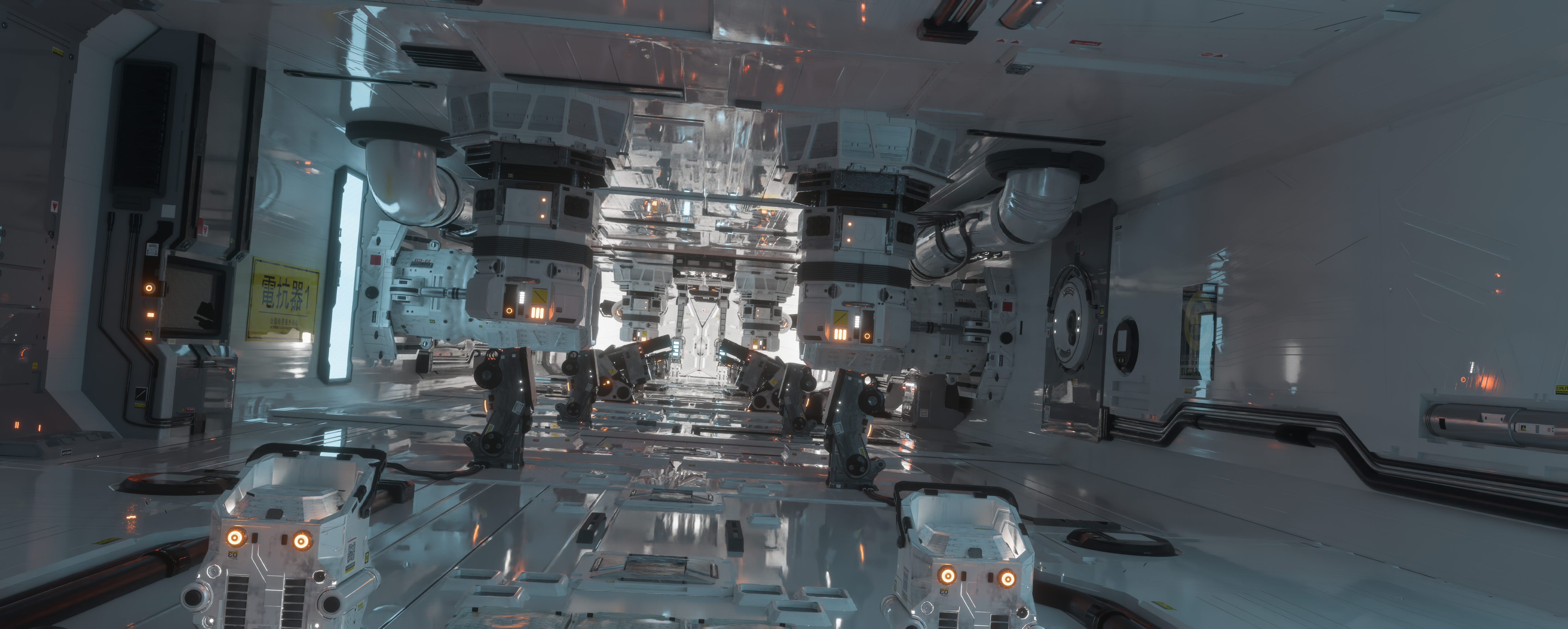
Solari has been a years-long project, but it's finally becoming production ready, and I'm really happy with what I've ended up with!
NVIDIA Zorah Scene, Solari rendering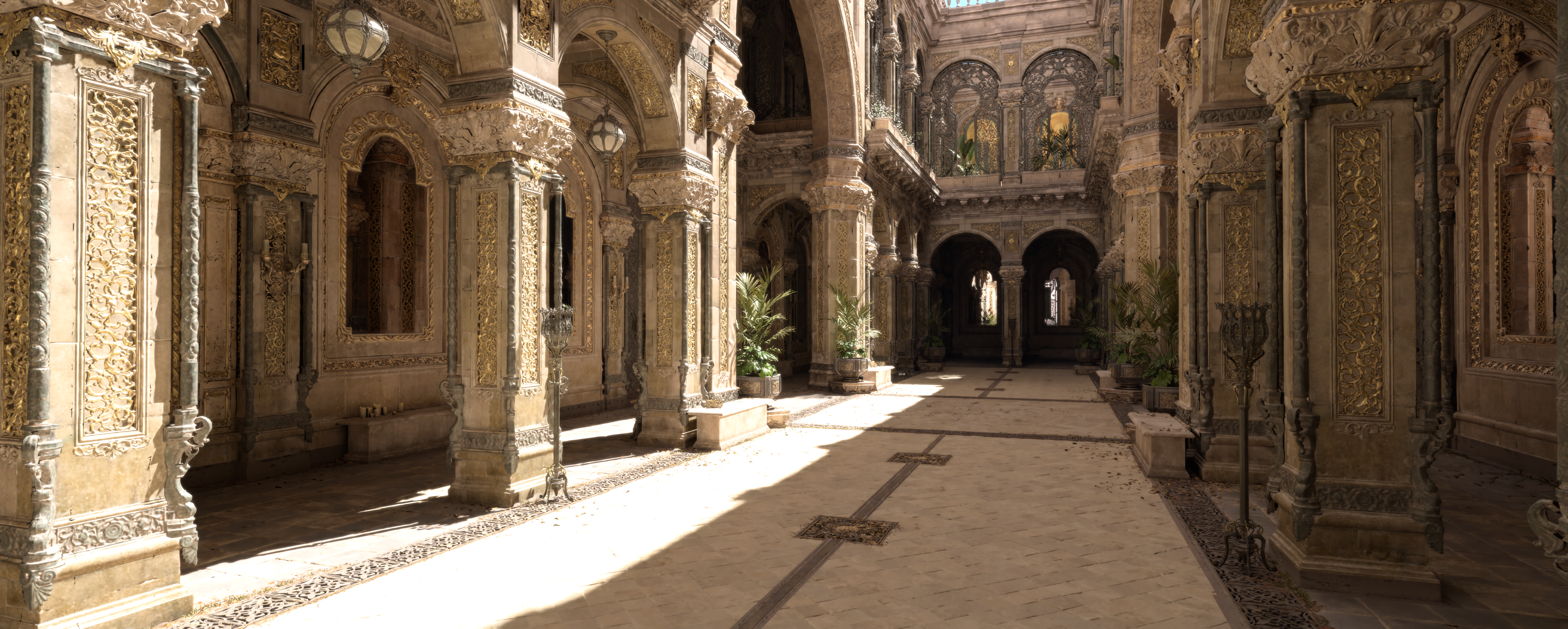
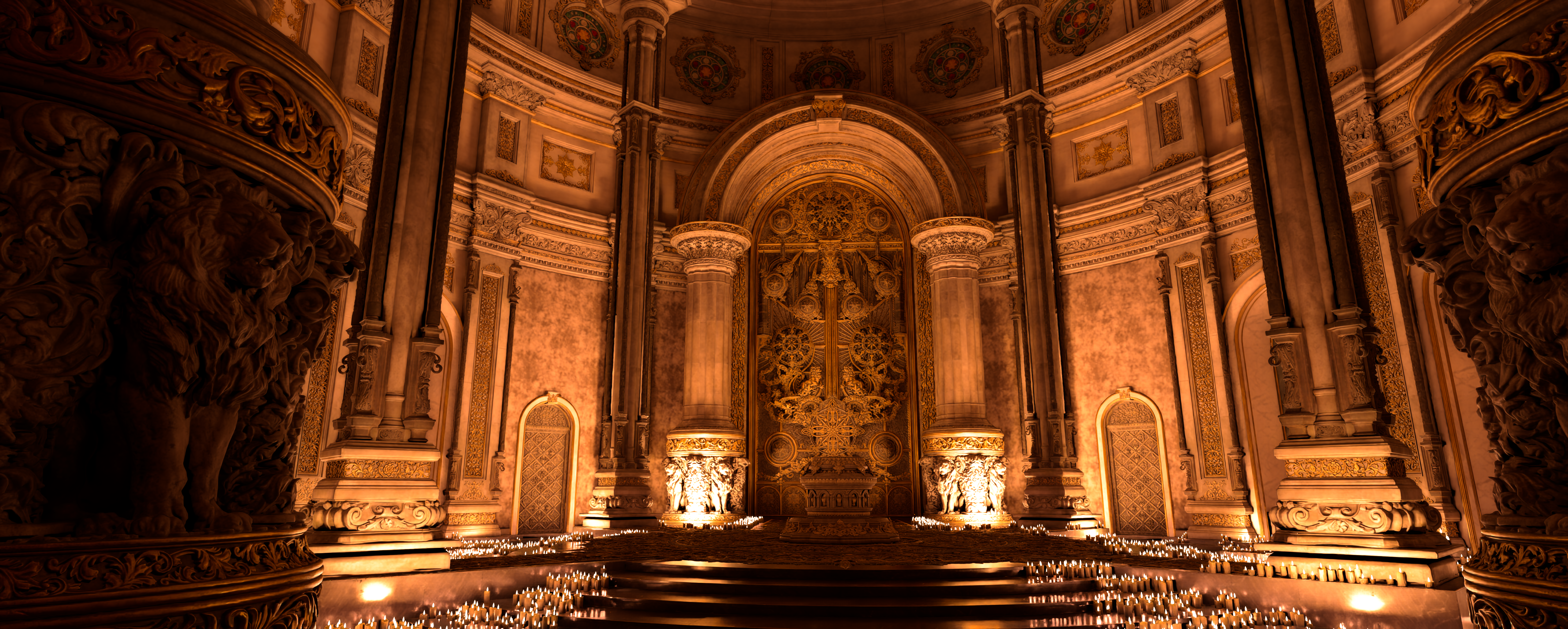
It's been a long, long journey through several different rewrites:
- Lumen/AMD GI like screen-space probes (diffuse GI only), a spatial hashing based world irradiance cache, and a spherical-harmonic based spatial denoiser
- The above, but now with radiance cascades added
- Added a somewhat bad ReSTIR DI for direct lighting
- <2 year long gap>
- Complete rewrite, now ReSTIR DI + GI (still diffuse only) + the same world cache + DLSS-RR
- Added a separate pathtracing pass dedicated just to indirect specular (ReSTIR DI now shades direct specular, but still resamples based on diffuse)
- Another complete rewrite, now with a single unified pathtracer tracing direct and indirect diffuse and specular lighting, and a single ReSTIR pass resampling everything using the reconnection shift
- DLSS-RR 4.5 has gotten so good, ReSTIR is now optional!
Cornell Box, old version of Solari GI from 2023, screen-space probes with world-space radiance cascade intervals The cascades merged together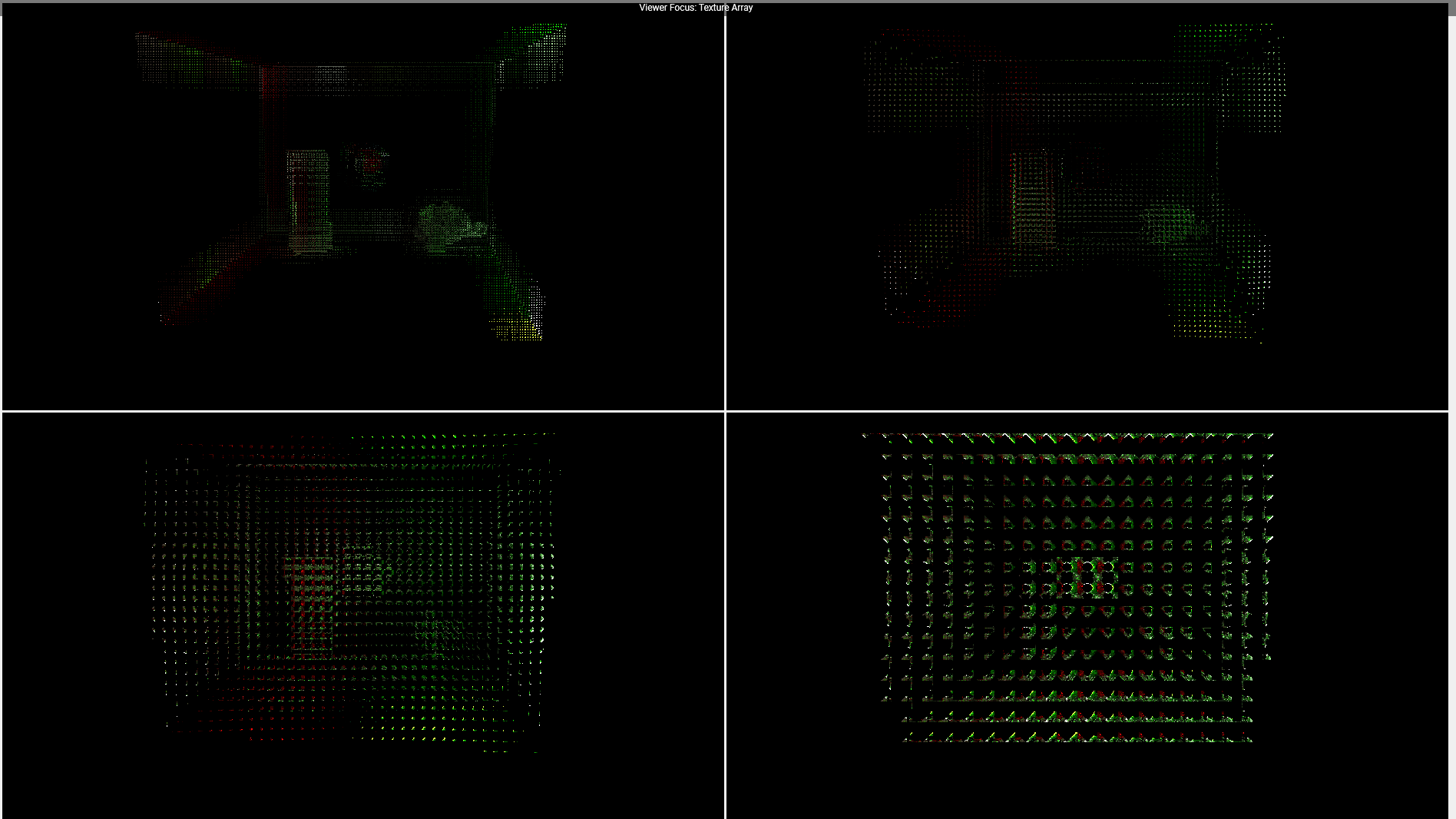
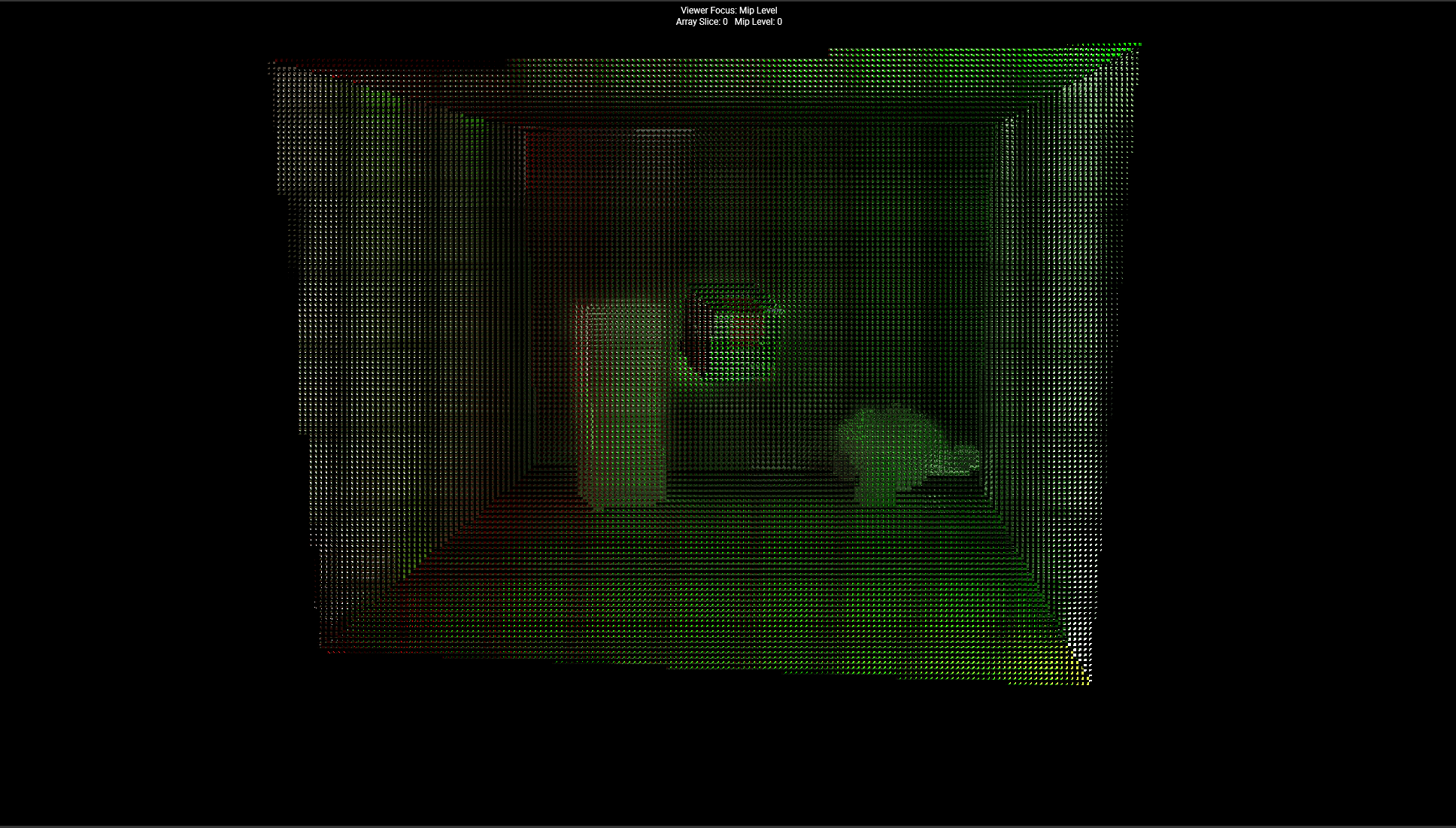
There's still a decent amount to do, notably supporting transparent materials and more types of light sources, but the core lighting algorithm is pretty solid!
I'm really proud of how everything's turned out. Expect another blog post on Solari soon for Bevy 0.20, where I'll cover things in more detail, and stay tuned for a formal publication coming at the end of the year that I can't talk about too much yet :)
NVIDIA Zero Day Scene, Solari rendering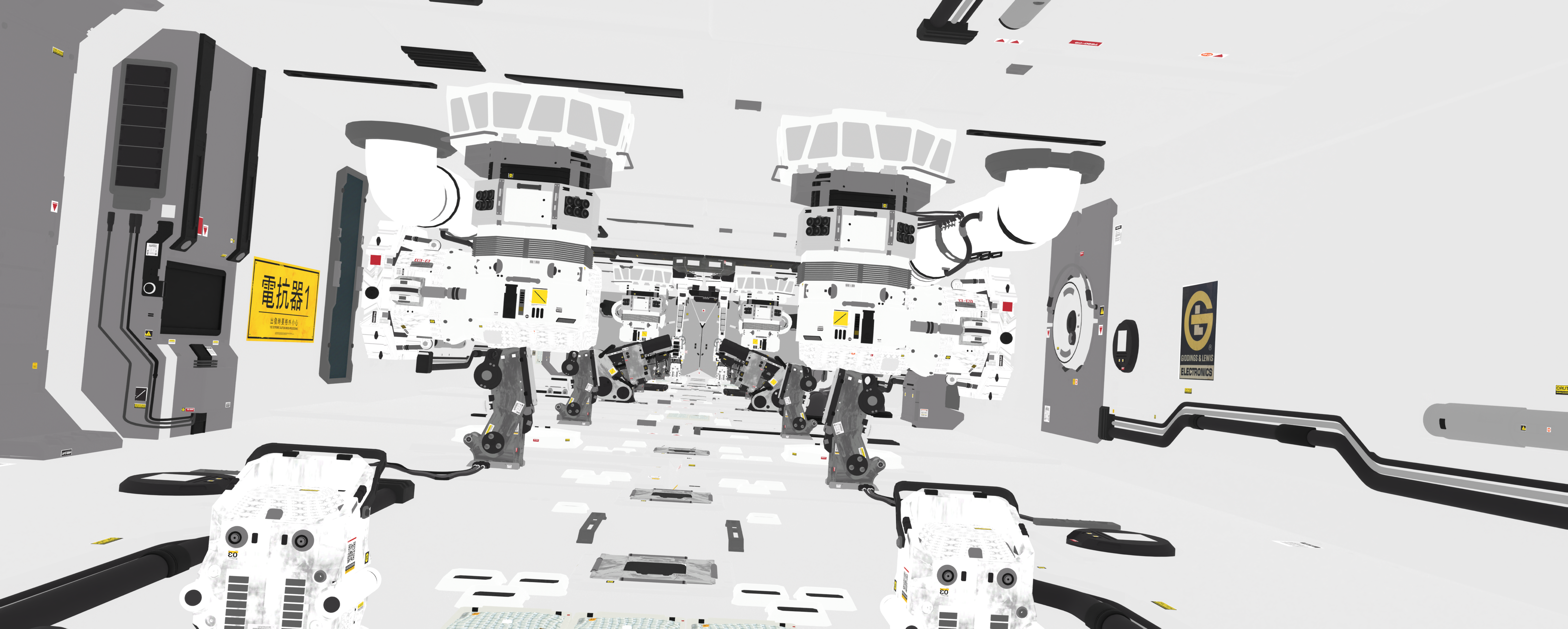
dlss_wgpu
Of course, a key part of my pivot to per-pixel pathtracing in Solari was predicated on having a good denoiser (ideally one that I didn't have to write myself). For that, NVIDIA's DLSS-RR and NRD were the best options available.
One of my first contributions to Bevy was a TAA implementation I wrote, so adding DLSS support was a nice blast from the past :)
Getting DLSS/FSR integration in Bevy has been something I have been eyeing for a long while, but getting them working with wgpu's resource tracking and automatic barrier system took some effort!
I ended up submitting a PR to wgpu last year to add a new transition_resources() function (which in hindsight should probably have been named something like record_resource_usage). This lets you insert new usage scopes into wgpu's resource tracker, enabling users to integrate Vulkan/DirectX12/Metal libraries directly with wgpu.
Otherwise, there would be no (simple) way for users to e.g. insert a barrier and transition a texture from color attachment to shader read layout. This, along with some new as_hal() APIs, allows Bevy to now record depth/normal/color/etc data, pass it to DLSS, and then read DLSS's result back into wgpu-land.
I've packaged up the barrier code, C FFI, wgpu<->Vulkan interop, and DLL-linking build scripts into an open source, Bevy-independent crate called dlss_wgpu. If you're looking to add DLSS-SR or DLSS-RR to your wgpu project, give it a try!
In Bevy, DLSS-RR works as a great denoiser + upscaler for Solari, and DLSS-SR works as a better, mostly drop-in replacement for Bevy's TAA.
I'd love to add FSR4 and FSR4-RR support to Bevy as well, but unfortunately AMD has not released any Vulkan bindings for them at this time.
CompressedImageSaver Revamp
The other major project I worked on this year was revamping Bevy's texture compression pipeline.
Until recently, Bevy's only option for texture compression and mipmap generation was an old version of Basis Universal. Basis Universal is sort of an intermediate format, that gets transcoded to BCn/ASTC at runtime. It's useful for web, as it lets you avoid shipping two sets of textures, but it's not so great for desktop and mobile. It's much better to just encode directly as BCn/ASTC for these platforms.
The problem is that until recently, there's been no good tool or library for compressing textures for different platforms. There are several disparate tools, each with their own weird input formats, quirks, and supported or unsupported target formats. Trying to wrap different tools in a unified interface was... not very easy, and I gave up trying.
However, @cwfitzgerald (a maintainer of wgpu) released ctt this year - a Rust texture compression library that can take texture data of various layouts, generate mipmaps, encode into the various BCn/ASTC/etc formats (via FFI to all the different encoder libraries), super-compress with ZSTD for smaller disk sizes, and finally spit out a ktx2 file - all through one unified interface. It's a huge achievement, and I highly recommend using it if you need texture compression. There are even C bindings available!
I took ctt, and used it as the new backend for CompressedImageSaver in Bevy. Look forward to much improved texture compression in Bevy 0.20!
Huge thanks to @cwfitzgerald for helping me integrate ctt, fixing bugs I reported, and for creating ctt in the first place.
Using AI
I would like to take a moment to talk about how AI has affected my work in Bevy this year. I'm not going to talk about what I think the future will be like, how this affects software engineering as a job, how you should or should not be using AI, ethical concerns, etc. All that has been said and much, much more. I have nothing new or interesting to add in that respect.
However, in the spirit of this being a yearly reflection, I'm going to talk about my personal experience with AI. Feel free to skip this section.
This was the first year I've started using AI, after not really liking or using it in 2025. Sometime in early 2026, LLMs and associated tooling like Claude Code reached an inflection point. They became much more capable, and something I actually find useful. I also got access to AI subscriptions at work, so there was no cost to me if I wanted to use it.
To frame the rest of this section, I mainly use the Claude Code VSCode plugin, usually in auto mode on Opus high.
So starting off, AI has definitely saved me a lot of time. Bevy is something I contribute to in my spare time, of which I have a very limited amount. If I can get a few agents to investigate and reproduce bug reports while I'm eating lunch, that saves me a ton of time and energy that I can devote to real, impactful improvements in Bevy.
I've also found it super useful for "tooling" related tasks that are tedious, and get in the way of actual work. E.g. adapting scenes from online and getting all the meshes, materials, cameras, lights, etc set up in Bevy. The Zorah and Zero Day scenes in the screenshots above were set up by AI (thanks to @stuartparmenter).
Similarly, I've used AI a lot for generating throwaway debug overlays when working on Solari. E.g. visualizing post-denoiser variance when I was testing some DLSS-RR-related changes. Before AI, I would not have spent the effort making such a specific tool for just a single task.
I've talked before about how often I need new GPU features that wgpu doesn't expose, and how I never really wanted to spend time contributing to wgpu instead of working more on Bevy. AI has been pretty useful for me in this respect. I can point it at a feature I want, the Vulkan/DirectX12/Metal specs, etc, and it can wire all the extension enablement, shader translation plumbing, etc through wgpu and naga, across 50+ files, and then write some test shaders. It's the kind of work that's extremely easy to verify, but extremely tedious to write by hand.
I've contributed several PRs to wgpu this year thanks to AI (and not only me; wgpu's open PR count has doubled in the last few months, not due to review times getting longer, but due to the sheer velocity of new PRs).
On the other hand, I've found AI pretty worthless for actually complex tasks. E.g. when asking it about complex MIS weights in ReSTIR, if I asked 6 different times, it would give me 6 different conflicting answers about whether the math was right or not, even when prompted to verify everything that it can through code. Maybe if I used Fable max and let it run for 16 hours I would have had a different experience, but I'm not going to do that.
Furthermore, even if AI could give me the right answer, I wouldn't understand it. I've found that it's very easy to produce something working without putting effort into the design, but if you keep doing that, you very quickly start having zero understanding of what you've built, and can no longer reason about it. It becomes impossible to further work on the project, and generally just feels awful. Maybe eventually AI will become so good that this won't be an issue, but currently it's very easy to move fast while having no idea where you've gone and how to go forward. To me, this is a bigger problem than any individual slop PR.
Asking AI to explain things is not a solution, as it does a terrible job of explaining its own code. One of the biggest issues I've had reviewing code this year is just the terrible comments, documentation, and PR descriptions AI writes. It's somehow both dense, and yet utterly meaningless. I am fairly sick of reading AI-generated text.
When it comes to the human aspects of AI, things are much worse. Bevy, thankfully, never really had the problem of hundreds of drive-by slop PRs. Instead, what we have had is a lot of arguments and distrust within the community as a result of AI.
We recently changed our contributing policy from what I'll summarize as "no AI, at all" to "some AI for code, so long as you act in good faith and show understanding and build trust in your code". Even that was extremely contentious, with the change coming mainly because the "no AI, at all" rule was impossible to enforce, and led to a lot of witch hunting.
Long-time contributors I've been friends with have become extremely burnt out and disengaged from Bevy, OSS, and even programming in general, in large part due to AI (and in part due to e.g. lack of an editor for years).
I have no magic solution to this, but I ask everyone: be kind to each other. We all want to see Bevy succeed, and we have more in common than we do differences that divide us.
Questions & Answers
On a lighter note, for this blog post, I solicited some questions from the Bevy community to answer. Questions have been lightly edited for the purpose of a smoother reading experience.
Question 1
I'd like to hear more about future rendering plans that might be more unknown to the broader community, if there is any?
My personal rendering plans for next year are to continue wrapping up Solari, and potentially go back to virtual geometry. I have been thinking about building a material layering system, although there are some technical blockers holding that up at the moment.
In terms of broader plans, here's what I've been seeing discussed (keep in mind that none of these are commitments!):
- HDR display support (currently being worked on by @stuartparmenter!)
- Bevy's material API is too low level, and tied to the technical details around how the renderer works (e.g. APIs for supplying a fragment shader for deferred/forward/virtual geometry/etc). We need some higher level APIs that under the hood, we can then adapt to different rendering and data storage methods. GpuComponentArrayBuffer is a recent step in the right direction.
- Unifying the 2D and 3D renderers, and e.g. replacing Sprite with SpriteMesh
- Adding some sort of built-in API for texture/mesh streaming (mesh streaming could potentially be delegated to virtual geometry)
- More work on volumetric rendering
- As always, hoping that WebGPU finally ships everywhere, so we can deprecate WebGL2 and assume storage buffers and compute shaders everywhere (fingers crossed that this is the year!)
Question 2
I think thoughts on stability and reliability and well tested well used parts of Bevy rendering could be good. Lots of software out there today, and I think people are starting to look for quality
Yeah, this is a hard one. It's been discussed a lot in the Bevy community. We're very aware of the issues users are facing.
Starting with reliability:
On one hand, shipping bugs, especially regressions, sucks and contributes towards a sense of unreliability that makes it hard for people to trust that Bevy is "production ready".
On the other hand, squashing every or even most bugs is not realistically something we can, or should really try to do.
Shipping with ~zero bugs on the level of e.g. SQLite would mean drastically slowing down on developing new features. This would be a net negative overall, as an engine with no features is way less useful than a much more featureful engine that's a bit buggy.
Every new feature, especially in rendering, tends to involve a large rewrite of and intersection with existing systems, with more and more potential for breakage. We could introduce some new feature X, but actually under TAA there's an issue, or when using multiple cameras, or it used to work with shadow maps and then we change the shadow pass internals which breaks that interaction or regressed performance on certain GPUs, etc.
So you could say, add more tests! And we do. It's helped a lot compared to when we had nothing, but there's only so much we can cover. We will never be able to cover every interaction between techniques, regressions on specific mobile devices with poor GPU drivers, etc.
The release candidate process we adopted last year does help a lot with both reliability, and giving library authors time to update their plugins before the official release. But it's also brought its own share of issues, e.g. Bevy 0.19 being very delayed from our typical 3 month schedule, in part due to the large number of bugs we spent time fixing, rather than sticking to the release schedule.
In terms of stability, I'd much rather make breaking changes than try for backwards compatibility. Game engines are huge, have a lot of surface area to cover (rendering, physics, ui, assets, artist tooling, etc), and are constantly evolving. I'd much rather improve things but cause some breakage, rather than try to introduce more mess trying to make things backwards compatible.
My advice for game developers: stick to a single version of Bevy, and backport individual parts if needed. The same advice applies to pretty much every game engine on the market, but one of Bevy's major benefits is modularity. Don't be afraid to pull in a new feature from a newer version via copy and pasting the plugin into your project, rather than trying to upgrade your whole game to a newer version of Bevy all at once.
Question 3
Testing and quality refinement strategies for rendering in general would be super interesting to read about
I talked about this a bit in the AI section above, but to me this comes down to good tooling, and good test scenes that are representative of actual games. Automatic screenshot and video comparisons, profiling runs, hot reloading, etc are essential to improving rendering. I need to be able to make a change, see what changed (both visually, and numerically compared to path-traced ground truth), how that affected perf, etc. And then do the same in 10 other scenes with varying levels of geometric complexity, size, material types, animations, lighting conditions, etc to ensure it's an improvement across the board.
For Solari, I've slowly been building up a set of test scenes and one-off AI generated tools for helping me with this. E.g. a debug overlay to run through a specific part of a scene while visualizing correlations on both smooth and rough dielectrics and metals, for tweaking ReSTIR heuristics.
Question 4
For me and I think a lot of other gamedevs, rendering is one of those things that is a voodoo sorcery black box where materials and meshes go in and pretty pictures come out. So, this may be a big ask, but my question is "as an engine dev do you have any resources to link or recommend that help crack open that black box and make it easier to understand?"
Honestly, not really! I did try and write some higher-level docs for the Bevy book this year, but never finished or merged them. For specific rendering topics, there are lots of individual papers and articles I could point at, but I don't have anything for people just starting out.
Rendering is a really broad area! There's a lot of things that boil down to "it's done in this extremely complex, specialized way, because performance".
I would say, unless you're really interested in being a rendering developer, you probably don't need to learn the details! The goal of engines like Bevy is to do all that for you, so that you don't need to learn and implement it all from scratch yourself. Learning how to use the tools, as an artist, should suffice for most users.
If you are interested in rendering development, my recommendation is:
- Read through a couple of recent frame breakdowns to get a broad sense of how real games are rendered. If you see something you don't recognize, do a quick google to get an idea of what it is, what the alternatives could be (e.g. baked vs dynamic lighting), and why the game might have chosen to do it this way.
- For Bevy specifically, come ask questions in #rendering or #rendering-dev in the Bevy discord! We're always happy to talk and help people understand things!
That's it for this year. Happy sixth birthday to Bevy!